Give your agent eyes for your private video library.
Focus MCP lets compatible AI agents find exact moments in videos stored on your computer. Your agent can inspect the source, prepare Selects, build sequence proposals, and get clips ready for export.
Local video indexing. Approval required before changes.
Your drivePrivate video files
Focus MCPLocal stdio server
Your agentFind · verify · prepare
Visual match 92%
Quote found 01:08:34
Selects proposal Ready
Describe it. Your agent finds it.
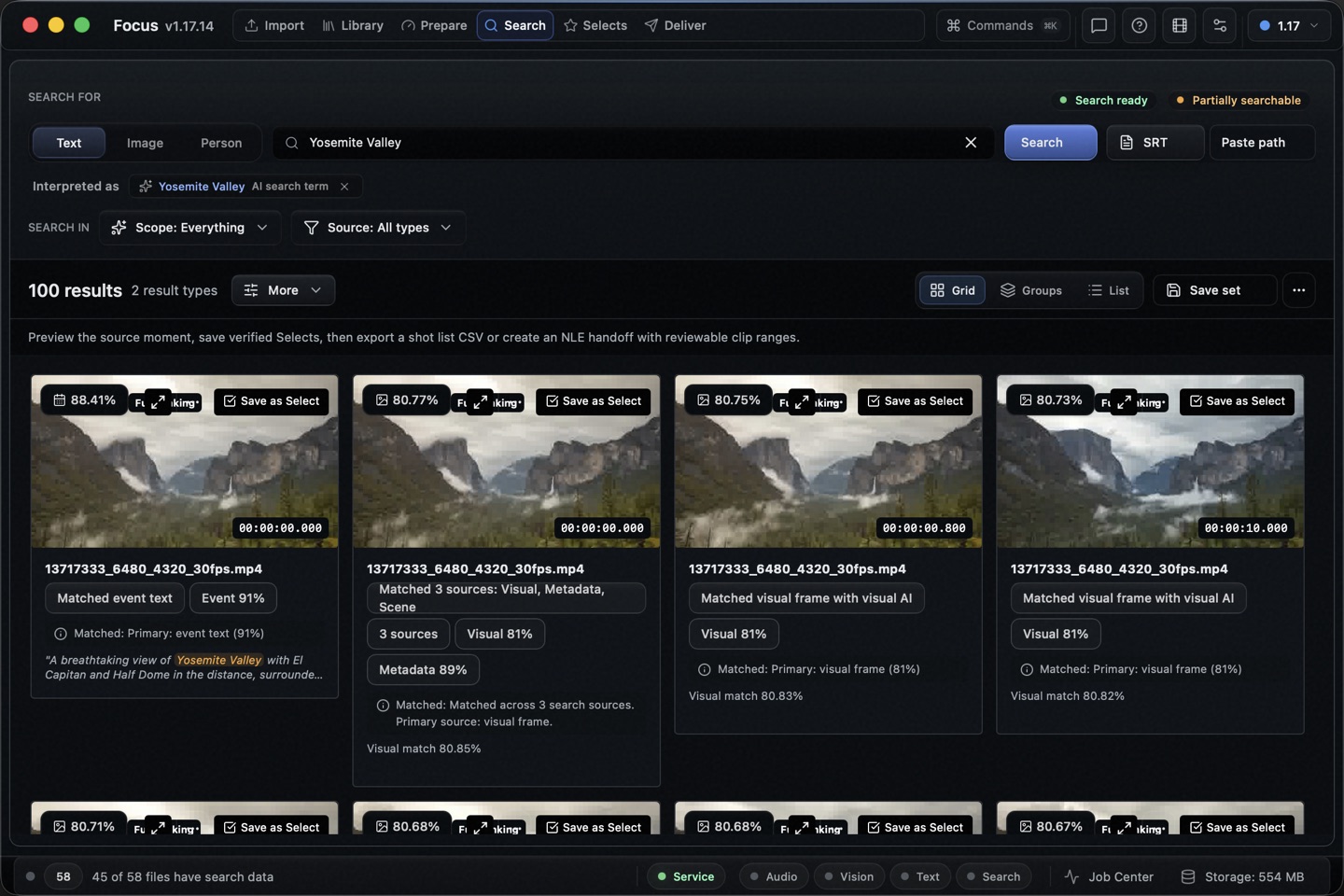
Search across speech, visual details, people, and indexed context. Focus returns the video, exact time range, and the evidence behind the match.
Focus MCP connectedDemo library
You
Find the wide shot where the hiker reaches the waterfall.
focus_search_moments
query: "hiker reaches the waterfall" · scope: visual
Agent
I found 4 matching moments. The strongest starts at 00:42:16.
I checked the source range and kept the exact Focus video ID.
00:42:16
Source found in Focus00:42:16
Keep the explanation. Show the complete demonstration.
Follow one workshop edit from the original recording through a correction and an editable sequence.
Original generated sample with captions and no spoken audio. These are reference renders, not a recording of a live agent session or a transcription benchmark.
The explanation runs from 06–14 s. The demonstration starts at 18 s and its result becomes visible at 24 s.
Find and inspect. Search for “Keep the highlights” and play the source passage. Compare the wording in the second recording.
Save the moments. Review a Selects proposal with the explanation and demonstration, then prepare a sequence.
Correct the ending. Ask: “Keep the first clip. Extend the demonstration to include the window detail returning.” Verify the new source range before applying it.
Continue editing. Make a manual adjustment in Focus, then ask the agent to read the saved sequence before its next proposal. The revision must preserve that adjustment.
Hand off. Export FCPXML or Premiere XML from Focus. In your editor, check the source file, 06–14 s and 18–30 s ranges, and 20 s total duration.
Try a complete task with your agent.
Connect Focus, copy a recipe, then verify a useful source passage before saving or exporting anything.
Extract the ZIP, add the two source recordings to Focus, and import their English embedded subtitle tracks in the Transcript tab. The included SRT files and expected ranges make the example reproducible. You can also use your own footage.
Extract a workshop demonstration
Keep the explanation and the complete demonstration together.
Read the prompt
Use Focus to find an explanation followed by its demonstration in my workshop recordings. First check Focus status, the active workspace and search readiness. Ask me to choose the recordings if the scope is unclear. Inspect the original source ranges and surrounding context; do not infer a demonstration from transcript text alone. Show me the explanation and demonstration with filenames and exact times. Propose a Selects list for my review, keeping the complete action and its result. Stop for approval before writing or exporting. If indexing or source files are unavailable, explain the specific next step instead of claiming a match.
Sample: exposure explanation at 06–14 s, demonstration at 18–30 s. The first 18–24 s suggestion cuts off the result; extend it to 30 s. The reviewed sequence lasts 20 s.
Find a quote across interviews
Compare exact wording and retain the context around it.
Read the prompt
Use Focus to find the quote I describe across my interviews. Check the active workspace and transcript readiness, then ask which quote and sources I mean. Search the transcripts, inspect each matching source range and nearby sentences, and show the exact wording, filename and timestamps. Distinguish an exact quote from a paraphrase. Let me play and confirm a useful result before proposing a Selects list. Do not claim coverage beyond the indexed sources or the transcript pages you inspected.
Sample: search for ‘Keep the highlights’. Compare workshop-exposure.mp4 at 06–14 s with interview-reflection.mp4 at 04–12 s; keep the complete sentence.
Turn reviewed moments into a sequence
Keep source ranges editable through review and NLE export.
Read the prompt
Use the moments I have reviewed in Focus to propose an editable sequence. Confirm the intended sources, order and duration with me, and preserve the exact source IDs and ranges. Use focus_propose_sequence with add_selection_to_montage and wait for approval. For a later change, use focus_list_sequences and focus_get_sequence to read the current saved draft, including my manual edits, before proposing revise_sequence with its current revision token. Change only the requested clips and show the duration difference. Keep export separate: after review, propose the supported NLE handoff with source media references. Never invent an approval or treat an exported file as an editable project.
Sample: explanation 06–14 s followed by demonstration 18–30 s, both from workshop-exposure.mp4. Verify the 20 s sequence in Focus, export FCPXML or Premiere XML, and check both source ranges after import.
Review and correct a saved cut
Inspect the exported frames around cuts and propose precise, undoable trims.
Read the prompt
Review my saved Focus sequence. Find the draft using focus_list_sequences and focus_get_sequence, then use focus_check_sequence. Capture suspicious cuts with focus_capture_sequence using the returned revision, exact first/last clip IDs and a fresh request UUID. Review the contact sheets and help me listen to the playable preview. Explain any keyframe timing differences. Propose only justified source-range changes with focus_propose_sequence_patch and wait for my approval. Preserve all other edits; recheck after approval. Do not claim that metadata checks or sampled images certify sound or continuity.
A report with source and sequence times, rendered cut previews, and a before/after trim proposal that rejects a stale draft.
The sequence revision controls require a Focus build that advertises focus_get_sequence and the revise_sequence proposal kind. If your installed version lacks them, use the sequence editor for the correction and export.
An agent can do more than name a file.
Focus gives your agent a careful path from a vague memory to source-backed editorial work.
Find
Search for a scene, quote, person, or visual detail in plain English.
Verify
Inspect the source moment, transcript, nearby context, and readiness warnings.
Prepare
Build a review queue, Selects list, sequence, or export proposal.
Approve
Review the proposal in Focus before any editorial change is applied.
Your computerSource videosFocus indexMCP server
Your footage stays put.
Focus indexes your source videos on your computer. The local MCP server returns only the bounded results your agent requests. It does not send your video library to a Focus cloud service.
Source files remain on your storage.
Search and inspection tools are read-first.
Editorial writes start as proposals.
Your chosen agent may send returned text or metadata to its model provider. Check that provider’s privacy terms before connecting private material.
Bounded tools for real video work.
Agents can read your library, search moments, inspect evidence, and prepare approval-required actions.
Find
Search speech, visuals, people, and indexed video context.
focus_search_momentsfocus_search_videos
Verify
Check the source, time range, transcript, and nearby evidence.
focus_inspect_momentfocus_get_video_transcript
Prepare
Prepare approval-required work for Focus to apply.
Focus shows the correct helper path for your Mac or Windows installation.
The short answers.
What is Focus MCP?+
Focus MCP is a local Model Context Protocol server for Focus. It gives compatible AI agents bounded tools to search and inspect your Focus video library, then prepare work for your approval.
Does Focus MCP upload my videos?+
No. Focus indexes your source videos on your computer, and the MCP server runs locally. It returns only the requested search results, metadata, and bounded text evidence. Your chosen agent may send those returned results to its model provider under that provider’s terms.
Which agents work with Focus MCP?+
Focus includes setup snippets for Codex, Claude Code, and Claude Desktop. The server uses standard local stdio MCP, so other compatible clients can connect to it too.
Can an agent edit or export my videos?+
An agent can find and verify moments, then prepare Selects, sequence, review queue, and export proposals. Focus requires your approval before it applies those proposals.
How do I connect Focus MCP?+
Install and open Focus. In Focus, open Settings, then Agents. Copy the setup snippet for your agent and run the built-in test.
Focus MCP
Your archive already has the answer.
Let your agent find the exact moment, check the source, and prepare what comes next.