Focus guide / 09
From your Library to your video editor.
Pick the videos you want to edit. Bring the full original clips into Final Cut Pro, Premiere Pro or DaVinci Resolve, with an optional starting timeline. No analysis is required.
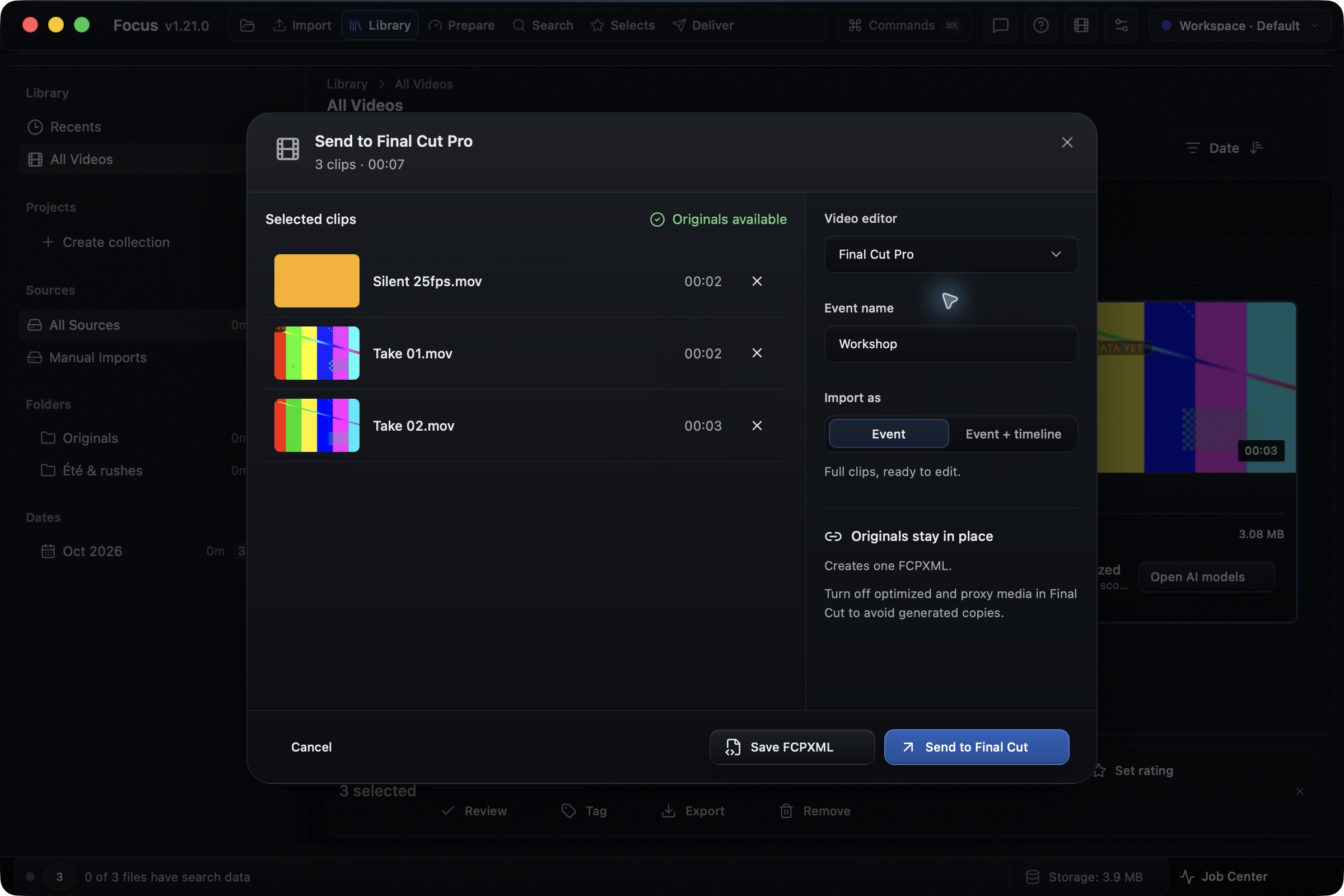
Captured in the released Focus 1.21.0 app with test videos. Interface shown in English.
Send the full clips to your editor.
Updated · Focus
In Focus Library, select your videos and choose Send to editor. Choose the editor, name the transfer and check that the originals are available. Send directly to Final Cut Pro on Mac, or save the editor file and import it. Focus writes references to the full original videos. Keep their drive connected while you edit.
Choose your clips. Continue the edit.
Available in Focus 1.21.0 for macOS with Focus Pro or an active trial. The Windows 1.21.0 installer is not yet published. These captures use three test clips in the released Mac app.
- 01
Select the videos in Library.
Open a folder, collection or Library view. Tick the videos you need, or choose Select all for the videos in view. Click Send to editor in the selection bar. You can transfer clips that have no search data.
Library → Select videos → Send to editorCaptured in the released Focus 1.21.0 app with test videos. Interface shown in English. - 02
Choose the editor and what to create.
Choose your video editor and enter a name. Final Cut Pro offers Event or Event + timeline. Premiere Pro offers Bin or Bin + sequence. Resolve creates a Media Pool + timeline handoff. Each option includes the whole original clips.
Video editor → Name → Import asCaptured in the released Focus 1.21.0 app with test videos. Interface shown in English. - 03
Check the order, then transfer.
If you chose a timeline, use the up and down arrows to arrange the clips. Wait for Originals available. On Mac, Send to Final Cut opens the import in Final Cut Pro. You can also save an FCPXML. For Premiere Pro, save an XML; for Resolve, save an FCPXML. Finish the import using the instructions below, then check the clips and audio in your editor.
Originals available → Send to Final Cut or Save XML / FCPXMLCaptured in the released Focus 1.21.0 app with test videos. Interface shown in English.
Finish the import
The steps for your editor.
Final Cut Pro
Full clips in an event. Add a timeline if you want a starting edit.
- Before importing, open Final Cut Pro → Settings → Import. Choose Leave files in place. Turn off optimized and proxy media creation if you want to avoid generated copies.
- In Focus, click Send to Final Cut and finish the import dialog. To import a saved .fcpxml, use File → Import → XML, or open the file from Finder.
- Check the event's clip count. If you chose Event + timeline, open the project and check the clip order.
Premiere Pro
Full clips in a bin. Add a sequence if you want them arranged in order.
- In Focus, choose Premiere Pro and click Save XML. Focus creates Premiere's XML format directly.
- Open your Premiere Pro project. Choose File → Import and select the saved .xml file.
- Check the imported bin and full clips. If you chose Bin + sequence, open that sequence and check the order and audio.
Choose the Premiere Pro target in Focus to get a .xml file. Premiere cannot directly import the .fcpxml created for the other editors.
Editor documentationDaVinci Resolve
Full clips in the Media Pool, plus an ordered timeline.
- In Focus, choose DaVinci Resolve, arrange the clips and click Save FCPXML.
- Open your Resolve project. Choose File → Import → Timeline and select the .fcpxml. Enable automatic source import into the Media Pool.
- Check the Media Pool clips and the imported timeline. If Resolve asks for media, select the folder containing the originals.
Resolve uses a timeline for this workflow. There is no Media Pool only option in the Focus dialog.
Editor documentationImport was checked in Final Cut Pro. The Premiere Pro and Resolve steps follow their documentation; check the result with two clips before transferring a large selection. Editor menus are shown in English.
If something gets in the way
An original is offline. What should I do?
Reconnect the drive or remount the NAS, then click Check again. If the source moved, restore access at the path shown. You can also remove that clip from this transfer. Removing a transfer row keeps the video in Library. Focus blocks the transfer while any selected source has an issue; it does not silently send a partial selection.
Do I need to analyze the videos first?
No. Once the videos are in Library and their originals are available, you can transfer them. This workflow uses whole videos. To send only chosen ranges, follow the Selects handoff guide linked below.
Why is the button missing?
Select at least one video in Library to show Send to editor. This feature requires Focus 1.21.0 and Focus Pro or an active trial. The current Windows 1.20.2 installer does not include this new Library workflow.
Can I send directly to Premiere Pro or Resolve?
For these editors, save the file from Focus and import it in the editor. Direct app handoff is available for Final Cut Pro on macOS. After a direct send, complete Final Cut's import dialog; the send confirmation alone does not confirm a completed import.
Does closing the dialog clear my selection?
No. Your Library selection stays in place. Switching editors inside the dialog keeps the transfer name and clip order, so you can use the same selection for another editor.
Start with two clips.
Import them into your editor. Check that both full clips play and the audio is present, then use the same steps for a larger selection.
Try Focus ProFind and review ranges across several videos, then export those ranges as a timeline.
Send Selects to an editor